
概要
- Packerを使ってWindows11の仮想マシンイメージを作成し、それをAzure Compute Gallery(ACG)に登録するサンプルです。Packer | HashiCorp Developer
Explore Packer product documentation, tutorials, and example…
- 手順を実行すると、リソースグループにあるACGに、仮想マシンイメージを0.0.1として登録します。
リソース種別 リソース名 備考 リソースグループ test-rg Azure Compute Gallery(ACG) test_gal VMイメージ定義 test-win11 作成イメージを0.0.1として登録 - Windows 11で動作するWSL(Ubuntu24)にAzure CLI(2.81.0)とpacker(1.14.3)をインストールして動作確認しています。
- ソースファイルはGitHubで公開しています。GitHub
Contribute to nextdoorwith/archives development by creating …
手順
- Azure CLIとpackerをインストールします。
# Azure CLIのインストール curl -sL https://aka.ms/InstallAzureCLIDeb | sudo bash # packerのインストール curl -fsSL https://apt.releases.hashicorp.com/gpg | \ sudo gpg --dearmor -o /usr/share/keyrings/hashicorp-archive-keyring.gpg echo "deb [signed-by=/usr/share/keyrings/hashicorp-archive-keyring.gpg] https://apt.releases.hashicorp.com $(lsb_release -cs) main" | \ sudo tee /etc/apt/sources.list.d/hashicorp.list sudo apt-get update && sudo apt-get install packer - Azure CLIでAzureにサインインします。
サブスクリプションが存在しない旨のエラーが出る場合、もう一度サインインしてください。az login - 仮想マシンイメージの登録先を作成します。
az group create --name test-rg --location japaneast az sig create \ --resource-group test-rg --gallery-name test_gal \ --location japaneast az sig image-definition create \ --resource-group test-rg --gallery-name test_gal \ --gallery-image-definition test-win11 \ --publisher mycompany \ --offer windows11 \ --sku win11-ent \ --os-type Windows \ --os-state Generalized \ --hyper-v-generation V2 az sig image-definition create \ --resource-group test-rg --gallery-name test_gal \ --gallery-image-definition test-ubuntu24 \ --publisher canonical \ --offer ubuntu \ --sku 24_04-lts \ --os-type Linux \ --os-state Generalized \ --hyper-v-generation V2 - 任意のディレクトリにpackerの定義ファイルを作成します。
ダウンロードが難しい方は、こちらからコピペしてファイルを作成してください。mkdir work_win11 cd work_win11 curl -sL -O https://raw.githubusercontent.com/nextdoorwith/archives/refs/heads/main/20260106_packer_azure/win11/win11.pkr.hcl curl -sL -O https://raw.githubusercontent.com/nextdoorwith/archives/refs/heads/main/20260106_packer_azure/win11/setup-winrm.ps1 - win11.pkr.hclを編集してサブスクリプションIDを埋め込みます。
...
  # ビルド環境
  subscription_id   = "901dxxxx-xxxx-xxxx-xxxx-xxxx6815c4eb" # ★環境に合わせて修正★
  location          = "japaneast"
  temp_resource_group_name = "pkrtmp-win11"
サブスクリプションIDが分からない場合、次のように確認できます。
$ az account list [ { "cloudName": "AzureCloud", "homeTenantId": "xxx", "id": "901dxxxx-xxxx-xxxx-xxxx-xxxx6815c4eb", "isDefault": true, "managedByTenants": [], "name": "Pay-As-You-Go", - packerを実行します。
packerは、一時的にAzure上に仮想マシンを作成し、イメージをバージョン0.0.1としてACRに登録します。正常に実行できた場合のログはこちらをご覧ください。
なお、実行完了まで20分ほどかかります。packer init . packer build . - Azureポータルで”Azure Compute Gallery”を開きます。
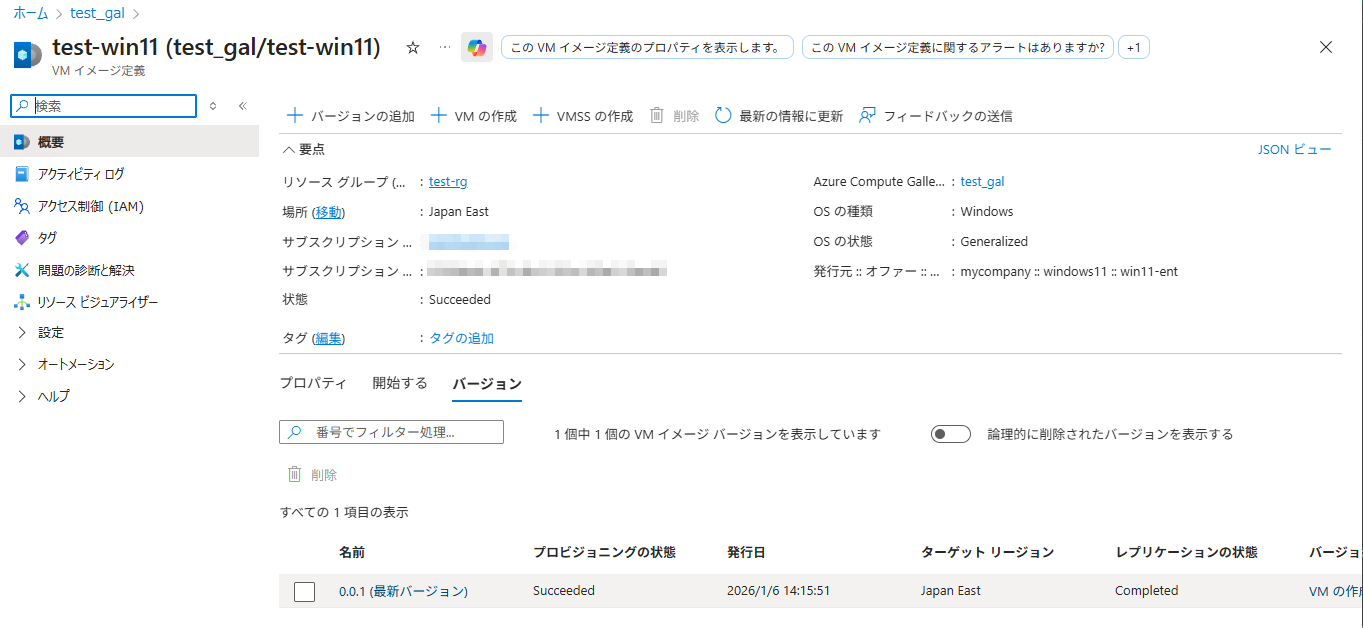
VMイメージ定義”test-win11″を開き、バージョン0.0.1が登録されていることを確認します。
参考
packer定義ファイル
- win11.pkr.hcl
作成するWindowのイメージや、それをAzure上で作成するための条件を指定するファイルです。# 共通 packer { required_plugins { azure = { source = "github.com/hashicorp/azure" version = "~> 2.0" } } } # ビルド定義 source "azure-arm" "windows" { # Azure CLIの認証情報を使用 use_azure_cli_auth = true # ビルド環境 subscription_id = "xxx" # ★環境に合わせて修正★ location = "japaneast" temp_resource_group_name = "pkrtmp-win11" # 仮想マシンのベースイメージ os_type = "Windows" image_publisher = "MicrosoftWindowsDesktop" image_offer = "Windows-11" image_sku = "win11-25h2-ent" image_version = "latest" # ビルドで使用する仮想マシンの仕様 # (実際の利用時は、その際にSKUなどの仕様を指定) vm_size = "Standard_D2s_v3" managed_image_storage_account_type = "Standard_LRS" # ビルドで使用する仮想マシンの制御 communicator = "winrm" winrm_use_ssl = true winrm_insecure = true winrm_timeout = "20m" winrm_username = "packer" winrm_password = "P@ssw0rd1234!" # "Waiting for WinRM ..."が終わらない対策 user_data_file = "./setup-winrm.ps1" # Azure Compute Galleryへの登録 shared_image_gallery_destination { resource_group = "test-rg" gallery_name = "test_gal" image_name = "test-win11" image_version = "0.0.1" # ACGでイメージを保持するストレージ storage_account_type = "Standard_LRS" } } build { sources = ["source.azure-arm.windows"] # 疎通確認用のダミー処理 provisioner "powershell" { inline = [ "Write-Host 'Build for ACG'", "Get-ComputerInfo | Select-Object OsName, OsVersion" ] } } - setup-winrm.ps1
Packerは、Windowsの遠隔操作のためにWinRMに接続します。既定では接続できないので、setup-winrm.ps1で認証やポート開放しています。(このスクリプトを含めないと、”Waiting for WinRM to become available…”から進まない。)# winrmを有効化するためのパッチ # (起動時に WinRM を強制的に有効化) # WinRMを有効化し、基本認証を許可する winrm quickconfig -q winrm set winrm/config/service/auth '@{Basic="true"}' winrm set winrm/config/service '@{AllowUnencrypted="true"}' # ファイアウォールでWinRMのポート(5985, 5986)を開放する New-NetFirewallRule -DisplayName "WinRM HTTPS" -Direction Inbound -LocalPort 5986 -Protocol TCP -Action Allow New-NetFirewallRule -DisplayName "WinRM HTTP" -Direction Inbound -LocalPort 5985 -Protocol TCP -Action Allow # ネットワークプロファイルを「プライベート」に変更(パブリックだと接続を拒否されるため) Get-NetConnectionProfile | Set-NetConnectionProfile -NetworkCategory Private - 業務で使用する場合、共通の設定はcommon.pkr.hcl、サブスクリプションID等の変数はvariable.pkr.hclで定義、変数に対応する値はpacker.auto.pkrvars.hclに定義、などのようにファイル分離することをお薦めします。
packer正常実行時のログの例
azure-arm.windows: output will be in this color.

==> azure-arm.windows: Running builder ...
==> azure-arm.windows: Creating Azure Resource Manager (ARM) client ...
==> azure-arm.windows: ARM Client successfully created
==> azure-arm.windows: Getting source image id for the deployment ...
==> azure-arm.windows:  -> SourceImageName: '/subscriptions/xxx/providers/Microsoft.Compute/locations/japaneast/publishers/MicrosoftWindowsDesktop/ArtifactTypes/vmimage/offers/Windows-11/skus/win11-25h2-ent/versions/latest'
==> azure-arm.windows: Creating resource group ...
==> azure-arm.windows:  -> ResourceGroupName : 'pkrtmp-win11'
==> azure-arm.windows:  -> Location          : 'japaneast'
==> azure-arm.windows:  -> Tags              :
==> azure-arm.windows: Validating deployment template ...
==> azure-arm.windows:  -> ResourceGroupName : 'pkrtmp-win11'
==> azure-arm.windows:  -> DeploymentName    : 'kvpkrdpa04853mon8'
==> azure-arm.windows: Deploying deployment template ...
==> azure-arm.windows:  -> ResourceGroupName : 'pkrtmp-win11'
==> azure-arm.windows:  -> DeploymentName    : 'kvpkrdpa04853mon8'
==> azure-arm.windows: Getting the certificate's URL ...
==> azure-arm.windows:  -> Key Vault Name        : 'pkrkva04853mon8'
==> azure-arm.windows:  -> Key Vault Secret Name : 'packerKeyVaultSecret'
==> azure-arm.windows:  -> Certificate URL       : 'https://pkrkva04853mon8.vault.azure.net/secrets/packerKeyVaultSecret/xxx'
==> azure-arm.windows: Setting the certificate's URL ...
==> azure-arm.windows: Validating deployment template ...
==> azure-arm.windows:  -> ResourceGroupName : 'pkrtmp-win11'
==> azure-arm.windows:  -> DeploymentName    : 'pkrdpa04853mon8'
==> azure-arm.windows: Deploying deployment template ...
==> azure-arm.windows:  -> ResourceGroupName : 'pkrtmp-win11'
==> azure-arm.windows:  -> DeploymentName    : 'pkrdpa04853mon8'
==> azure-arm.windows: Getting the VM's IP address ...
==> azure-arm.windows:  -> ResourceGroupName   : 'pkrtmp-win11'
==> azure-arm.windows:  -> PublicIPAddressName : 'pkripa04853mon8'
==> azure-arm.windows:  -> NicName             : 'pkrnia04853mon8'
==> azure-arm.windows:  -> Network Connection  : 'PublicEndpoint'
==> azure-arm.windows:  -> IP Address          : 'x.x.x.x'
==> azure-arm.windows: Waiting for WinRM to become available...
==> azure-arm.windows: WinRM connected.
==> azure-arm.windows: Connected to WinRM!
==> azure-arm.windows: Provisioning with Powershell...
==> azure-arm.windows: Provisioning with powershell script: /tmp/xxx
==> azure-arm.windows: Build for ACG
==> azure-arm.windows:
==> azure-arm.windows: Querying the machine's properties ...
==> azure-arm.windows:  -> ResourceGroupName : 'pkrtmp-win11'
==> azure-arm.windows:  -> ComputeName       : 'pkrvma04853mon8'
==> azure-arm.windows:  -> Managed OS Disk   : '/subscriptions/xxx/resourceGroups/pkrtmp-win11/providers/Microsoft.Compute/disks/pkrosa04853mon8'
==> azure-arm.windows: Querying the machine's additional disks properties ...
==> azure-arm.windows:  -> ResourceGroupName : 'pkrtmp-win11'
==> azure-arm.windows:  -> ComputeName       : 'pkrvma04853mon8'
==> azure-arm.windows: Powering off machine ...
==> azure-arm.windows:  -> ResourceGroupName : 'pkrtmp-win11'
==> azure-arm.windows:  -> ComputeName       : 'pkrvma04853mon8'
==> azure-arm.windows:  -> Compute ResourceGroupName : 'pkrtmp-win11'
==> azure-arm.windows:  -> Compute Name              : 'pkrvma04853mon8'
==> azure-arm.windows:  -> Compute Location          : 'japaneast'
==> azure-arm.windows: Generalizing machine ...
==> azure-arm.windows: Publishing to Shared Image Gallery ...
==> azure-arm.windows:  -> Source ID used for SIG publish        : '/subscriptions/xxx/resourceGroups/pkrtmp-win11/providers/Microsoft.Compute/virtualMachines/pkrvma04853mon8'
==> azure-arm.windows:  -> SIG publish resource group            : 'test-rg'
==> azure-arm.windows:  -> SIG gallery name                      : 'test_gal'
==> azure-arm.windows:  -> SIG image name                        : 'test-win11'
==> azure-arm.windows:  -> SIG image version                     : '0.0.1'
==> azure-arm.windows:  -> SIG target regions                    : '[japaneast]'
==> azure-arm.windows:  -> SIG storage account type              : 'Standard_LRS'
==> azure-arm.windows:  -> SIG image version endoflife date      : ''
==> azure-arm.windows:  -> SIG image version exclude from latest : 'false'
==> azure-arm.windows:  -> Shared Gallery Image Version ID : '/subscriptions/xxx/resourceGroups/test-rg/providers/Microsoft.Compute/galleries/test_gal/images/test-win11/versions/0.0.1'
==> azure-arm.windows:
==> azure-arm.windows: Deleting Virtual Machine deployment and its attached resources...
==> azure-arm.windows: Deleted -> Microsoft.Compute/virtualMachines : 'pkrvma04853mon8'
==> azure-arm.windows: Deleted -> Microsoft.Network/networkInterfaces : 'pkrnia04853mon8'
==> azure-arm.windows: Deleted -> Microsoft.Network/virtualNetworks : 'pkrvna04853mon8'
==> azure-arm.windows: Deleted -> Microsoft.Network/publicIPAddresses : 'pkripa04853mon8'
==> azure-arm.windows: Deleted -> Microsoft.Network/networkSecurityGroups : 'pkrsga04853mon8'
==> azure-arm.windows: Deleted -> Microsoft.Compute/disks : '/subscriptions/xxx/resourceGroups/pkrtmp-win11/providers/Microsoft.Compute/disks/pkrosa04853mon8'
==> azure-arm.windows: Removing the created Deployment object: 'pkrdpa04853mon8'
==> azure-arm.windows:
==> azure-arm.windows: Deleting KeyVault created during build
==> azure-arm.windows: Deleted -> Microsoft.KeyVault/vaults : 'pkrkva04853mon8'
==> azure-arm.windows: Removing the created Deployment object: 'kvpkrdpa04853mon8'
==> azure-arm.windows:
==> azure-arm.windows: Cleanup requested, deleting resource group ...
==> azure-arm.windows: Resource group has been deleted.
Build 'azure-arm.windows' finished after 16 minutes 46 seconds.

==> Wait completed after 16 minutes 46 seconds

==> Builds finished. The artifacts of successful builds are:
--> azure-arm.windows: Azure.ResourceManagement.VMImage:

OSType: Windows
ManagedImageSharedImageGalleryId: /subscriptions/xxx/resourceGroups/test-rg/providers/Microsoft.Compute/galleries/test_gal/images/test-win11/versions/0.0.1
SharedImageGalleryResourceGroup: test-rg
SharedImageGalleryName: test_gal
SharedImageGalleryImageName: test-win11
SharedImageGalleryImageVersion: 0.0.1
SharedImageGalleryReplicatedRegions: japaneast